Prompt · Travel Photo Field Notes
This ChatGPT Prompt Turns Your Travel Photos Into Field Notes
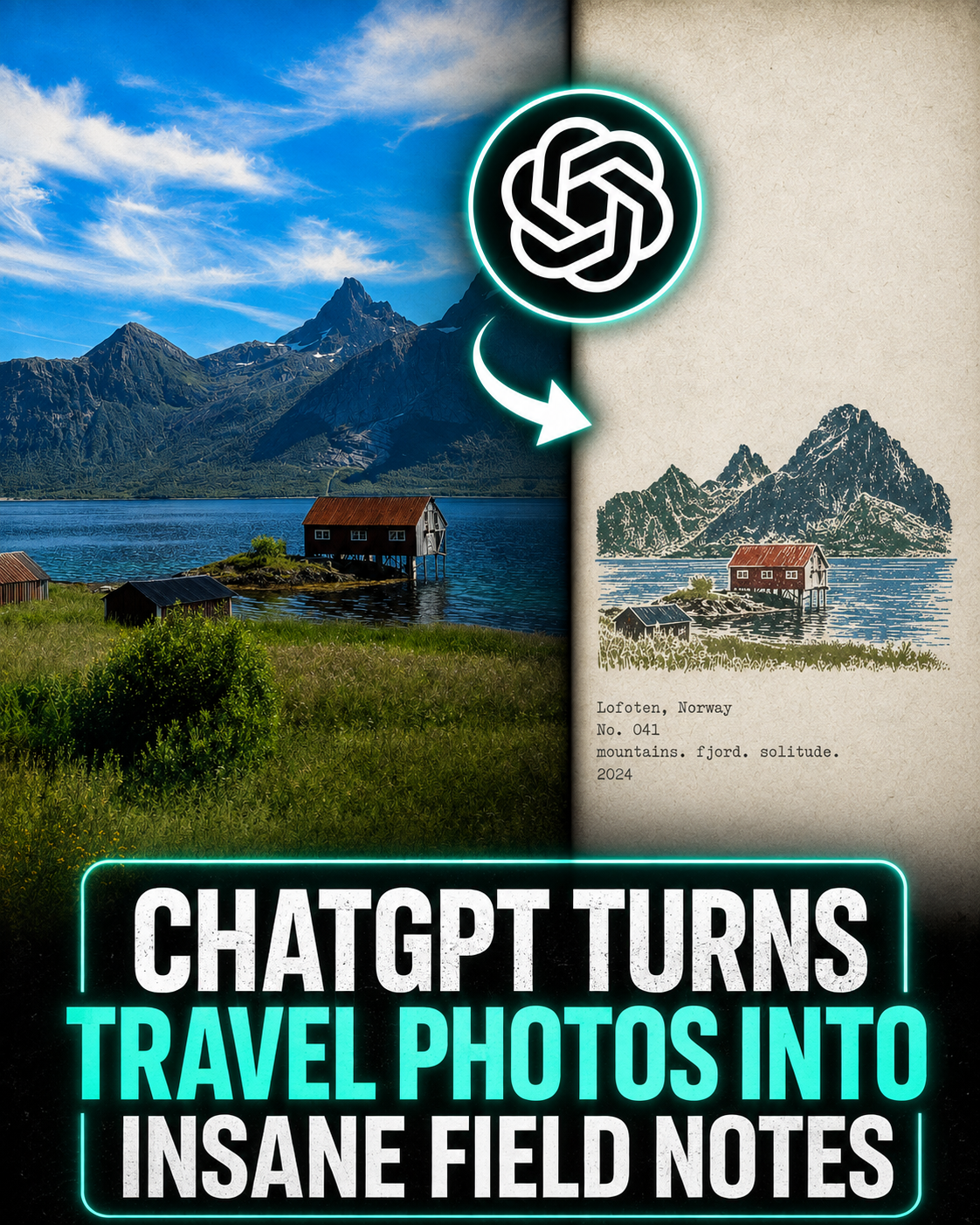
One prompt turns a travel photo into a page from a field notebook. Paste it into ChatGPT with any photo from a trip and you get back a 4:3 poster: the photograph kept intact on one side, a hand-carved rubber stamp of the same place on the other, plus a location, a number, and three keywords typed underneath.
Nothing in the prompt needs filling in. Run it once per photo and you get a single poster. Run it across a whole trip and the set reads like pages from the same notebook, numbered and consistent.
Below: how to run it, the full prompt, and a breakdown of what each part is actually doing.
How to Use This Prompt
01 · Run one photo at a time
Open ChatGPT, upload a single travel photo, paste the prompt below, and send. Batching several images in one go makes the model blend them together or hand back a collage instead of separate posters.
02 · Pick a strong silhouette
A dome, a tower, a crane, a coastline: anything with a clear outline stamps well. Busy street scenes with no focal point come out muddy. Landscape and portrait source photos both work fine. The output is always 4:3.
03 · Keep the series going
Use the prompt exactly as written, nothing to fill in. Ask for sequential numbers across a trip, No. 01, No. 02, and so on, so the whole set reads as pages from the same notebook.
The Rubber Stamp Field Note Prompt
This rebuilds a photo as a two-zone poster: the photograph untouched on one side, a hand-carved stamp of the same place on the other. A folder of unrelated holiday shots turns into one consistent set.
Copy and paste this exactlyTurn each photo I upload into its own standalone "rubber stamp travel field note" poster. Output one image per photo, never a collage.
LAYOUT
Use a 4:3 landscape composition split into a left and a right zone, with no visible dividing line between them.
LEFT (~58% of the frame)
Keep the original photo faithfully intact. Preserve the subject's identity, the terrain, architecture, vegetation, people, spatial relationships, natural light and shadow, real texture, and the original color mood. Apply only a restrained, art-publication-grade photographic grade plus very fine film grain. You may crop naturally to fit the layout, but never stretch, warp, move, replace, or redraw the subject.
RIGHT (~42% of the frame)
Use warm off-white aged paper as the background. The paper should show fine fibers, natural speckle, light handling wear, and a matte surface. Leave large areas completely unprinted, the white space is a key part of the composition, not filler.
THE STAMP
Study the original photo and pull out only the most location-defining elements: the main silhouette, architectural structure, the lay of the land, the posture of the vegetation, roads, a shoreline, or whatever key visual relationship defines the place. Compress those into a single small multi-color rubber stamp image.
Do not copy everything in the photo. Keep only the minimum information needed for someone to recognize the location, the subject, and the scene at a glance. Remove crowds, vehicles, dense rows of windows, repeated buildings, fussy small vegetation, decorative trim, and irrelevant background.
Place the stamp in the lower-middle portion of the paper zone. It should occupy only about 30-38% of that zone's height, with generous white space around it. Never scale it up into a regular illustration, a complete landscape painting, or a brand logo.
Let the original composition decide how the stamp is organized:
- Landmark building: keep the most recognizable outline, roofline, dome, arches, tower, or main structure.
- Hillside settlement: compress the buildings into a few stepped blocks of color following the terrain.
- Coastal scenery: keep the slope of the headland, the tiers of the settlement, the shoreline, and a few broken water lines.
- Distant cityscape: keep the main skyline, one landmark building, and one or two layers of distant hills.
- Natural landscape: keep the directional relationship between the main landform, trees, water's edge, or road.
- Foreground objects: keep them as a foreground stamp silhouette only if they matter to the story of the original image.
INK & COLOR
Extract 2-4 spot inks from the original photo. Favor desaturated tones like charcoal black, deep green, brick red, ochre, gray-blue, and gray-brown, but don't force a fixed palette onto the image. Keep the color character that makes the original photo recognizable, and allow only one small area of color as a visual accent.
Every color must look like it was stamped separately by hand: authentic carved-rubber texture, hand-cut marks, uneven line weight, gaps in the outline, broken edges, dry ink starvation, paper showing through, grainy ink, uneven pressure, slight ghosting in places, and about 1-2 mm of registration drift between colors.
Natural misalignment between color layers is expected, and edges must never look digitally smooth. The result should read as a genuinely carved stamp pressed onto old paper, not a filtered photo, not a smooth vector illustration, not a line-art logo.
TEXT
Generate the text from the location, subject, and visual motifs in the photo:
[Location name in English]
No. [number]
[three short English keywords]
[year]
Set it below the stamp or in the adjacent white space, in a small, restrained typewriter face with a touch of mechanical imprecision. The typesetting should look like a traveler's field record, not an ad headline. Spell everything correctly, and add no extra taglines, brands, or decorative copy.
OVERALL FEEL
Like a field notebook kept by an architect, a travel writer, or a naturalist: quiet, restrained, tactile, specific to its place, with the imperfections of handwork and the feel of something collected. The photo's job is to record what was there, the stamp's job is to keep the part of it worth remembering.
AVOID
An obvious center divider, circular seals, red Chinese chops, stamp perforations, wax seals, sticker collages, souvenir-shop templates, smooth vector logos, generic city icons, copying every building, overly dense engraving, a childlike craft look, cartoon styling, 3D rendering, plastic texture, smooth digital gradients, oversaturation, too much text, decorative clutter, and any redrawing or alteration of the original photo on the left.
Anatomy of the Prompt
never a collage and the one-photo-per-run rule attack the same failure from two directions. Shown several images at once, the model's instinct is to combine them, and you end up with a contact sheet instead of a clean poster.
~58% / ~42% fixes the split. Naming exact percentages instead of saying "on the left" and "on the right" is what holds every output to the same proportions, which is what makes a batch of photos look like one designed series instead of a pile of one-offs.
never stretch, warp, move, replace, or redraw protects the photograph itself. Left unchecked, image models drift toward regenerating the whole scene in their own style. This line is what keeps the left side an actual photo instead of an AI reinterpretation of one.
The long AVOID list at the end does real work. Without it, the model reaches for the nearest familiar template: circular seals, red ink chops, wax seals, souvenir-shop clip art. Naming those specifically is what pushes the output toward something that looks hand-carved instead of stock.
Try it on a photo from your last trip and see what comes back. If you're building a whole series, keep the numbering sequential and run each photo through separately.