

Best Free AI Websites

Free Tools

Bothatch

Description

Bothatch allows users to create their own custom chatbots using AI and GPT technologies with no coding required.

The process is relatively simple, with three straightforward steps to complete.

Use Cases:

Custom Chatbot Creation: Bothatch enables users to create custom chatbots tailored to their specific needs and requirements.

Document and Data Upload: Users can upload their documents or data into the system for the chatbot to be trained on, allowing for personalized chatbot responses.

Direct Chats for Training: Users can perform direct chats on the platform to train the chatbot and leverage its conversational capabilities using ChatGPT.

Integration: After training and testing, the chatbot is ready to interact and can be integrated into websites, WordPress blogs, Shopify e-shops, or other digital platforms.

No Coding Required: Bothatch’s user-friendly interface and AI-powered capabilities eliminate the need for coding, making chatbot creation accessible to a wide range of users.

FaceSwapper

Description

FaceSwapper is an online tool that enables users to seamlessly swap faces in photos and videos. It is free and unlimited, allowing users to upload a photo or drag and drop a .jpg or .png file.

Use Cases:

Photo Editing: FaceSwapper can be used for fun and creative photo editing, allowing users to swap faces in photos with friends or celebrities.

Video Editing: The tool can also be used for video editing, enabling users to swap faces in videos for comedic or artistic effect.

Entertainment: FaceSwapper provides entertainment value, allowing users to create funny and engaging content.

Education: Educators can use FaceSwapper to create engaging visual aids for their lessons, such as swapping faces in historical photos.

Research: Researchers can use FaceSwapper for academic purposes, such as studying facial recognition algorithms or creating facial composites.

Personal Use: Users can use FaceSwapper for personal use, such as creating unique profile pictures for social media.

AnimeArt.Studio

Description

AnimeArt.Studio is a free AI-powered tool that generates anime art. With no sign-ups, credits, or upgrades required, users can access this tool 24/7.

The website offers over 100 stable diffusion anime models for users to choose from.

Use Cases:

Art Generation: AnimeArt.Studio can be used to generate anime-style art for various purposes, such as illustrations, character designs, and concept art.

Voice Generation: The tool offers voice generation capabilities, allowing users to create anime-style voiceovers for their projects.

Video Generation: Users can generate animated videos with anime-style characters and scenes using AnimeArt.Studio.

Prompt Generation: The tool can generate prompts to inspire users and help them overcome creative blocks.

Inspiration: The website provides inspiration and demos to help users get started with their anime art projects.

Model Exploration: Unlike other platforms that limit users to a single model, AnimeArt.Studio allows users to explore a diverse range of models using the same prompt.

Impressive Results: The AI anime models have been pre-trained on unique styles, ensuring impressive results with every use.

EarningsEdge.ai

Description

EarningsEdge.ai is the first and only earnings call analysis platform of its kind.

Use Cases:

Comprehensive Insights: EarningsEdge.ai provides comprehensive insights into a company’s performance, combining financial analysis with sentiment and vocal pattern analysis.

Strategic Decision-Making: The platform helps investors and analysts make more informed decisions by providing a deeper understanding of earnings call discussions.

Competitive Advantage: By offering a unique perspective on executive sentiment and internal dynamics, EarningsEdge.ai provides users with a competitive advantage in interpreting earnings calls.

Market Understanding: EarningsEdge.ai enhances market understanding by analyzing both the quantitative and qualitative aspects of earnings calls, giving users a more holistic view of companies’ performance.

Investor Relations: Companies can use EarningsEdge.ai to gain insights into how their earnings calls are perceived and make adjustments to improve their communication strategies.

Vispunk

Description

Vispunk is an image-first tool that enhances the workflow of generative AI for image creation.

It provides an alternative approach to traditional AI image workflows, emphasizing the use of images to compose coherent and customized results.

Use Cases:

Customized Results: Vispunk allows users to create customized images by adding their own images to the canvas and manipulating them using familiar tools and new features introduced by the tool.

Magic Assets: The tool offers Magic Assets, which allow users to sketch a rough shape and create unlimited images with a similar shape.

Workflow Enhancement: Vispunk enhances the workflow of generative AI for image creation by providing an intuitive and user-friendly interface.

Alternative Approach: Vispunk offers an alternative approach to traditional AI image workflows, giving users more control over the creative process.

Coherent Compositions: By emphasizing the use of images to compose coherent results, Vispunk helps users create visually appealing images more efficiently.

Wave

Description

Wave is an AI note-taking tool designed for iOS devices that records audio and phone calls, transcribes and summarizes them, giving you smart summaries of your most important moments.

It goes beyond simple note-taking by leveraging AI technology to generate insightful summaries from your recordings.

This feature is useful for capturing the essence of brainstorming sessions, lectures, fitness instructions, and more, without the need to sift through hours of audio.

Use Cases:

Meeting Summaries: Wave can provide summaries of important meetings, helping you capture key points and action items.

Phone Call Transcriptions: The tool can transcribe phone calls, making it easier to review important information discussed during the call.

Doctor Visit Summaries: Wave can summarize important details from doctor visits, ensuring you remember important instructions and advice.

Lecture Summaries: Wave can generate summaries of lectures, helping you review key concepts and information.

Brainstorming Session Highlights: The tool can highlight key ideas and insights from brainstorming sessions, making it easier to follow up on promising concepts.

Fitness Instruction Summaries: Wave can summarize fitness instructions, helping you remember exercise routines and techniques.

GPT Stylist

Description

Refire Design’s GPT Stylist is an AI tool that specializes in designing and styling content. It utilizes GPT (Generative Pre-trained Transformer) technology to provide smart color and design suggestions based on user prompts.

Use Cases:

Color and Design Suggestions: GPT Stylist offers suggestions for color schemes and design elements based on user input, helping users create visually appealing content.

Prompt-based Palette: Users can access a prompt-based palette to choose from a range of color and design options, making it easier to select the right elements for their content.

Ease of Use: The tool is user-friendly and suitable for those who may struggle with design decisions, offering guidance and inspiration.

Time-Savings: By providing quick and relevant design suggestions, GPT Stylist helps users save time in the content creation process.

Current Trends: The tool ensures that design suggestions are up-to-date with current trends, helping users create modern and engaging content.

Videeo

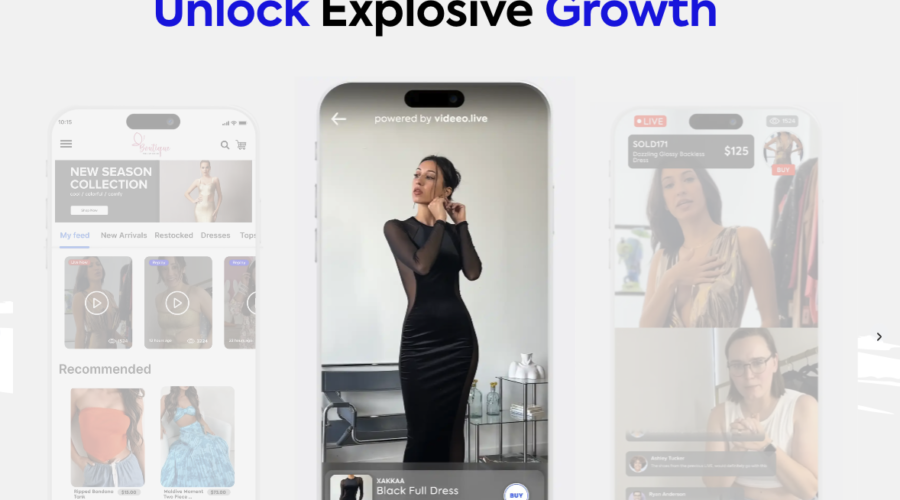
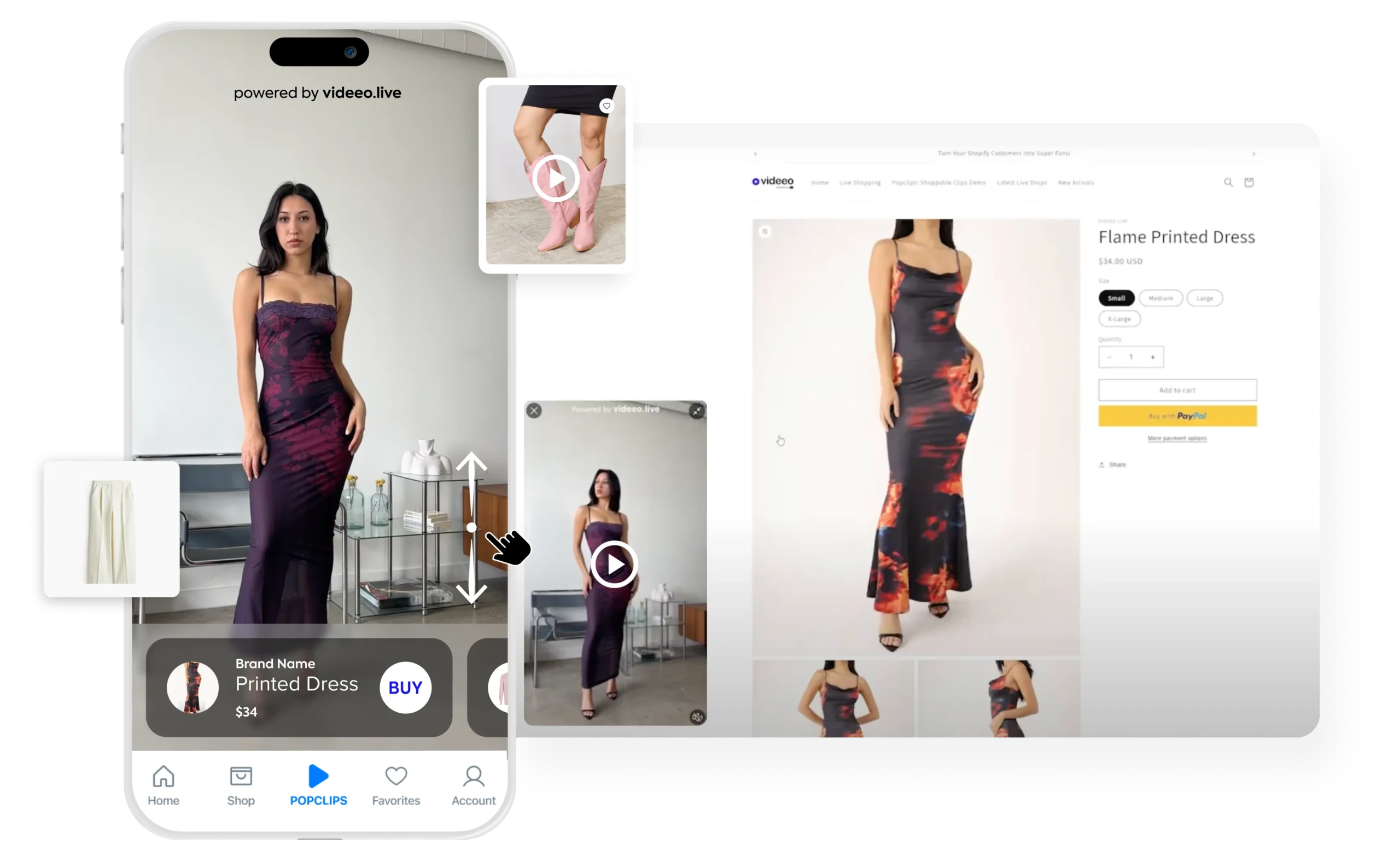
Boost Your Shopify Store with Shoppable Videos and a TikTok like Feed

Supercharge your static product pages with automatically placed videos engaging new generation of shoppers through their social love language! Spur impulse purchases with a swipe-up shoppable video feed, increasing sales by 400%.

Ever wondered how to elevate your retail strategy in the video-first era? Enter Popclips – simple, powerful, shoppable videos that let you highlight and tag up to five products per video clip with direct in-video shopping.

These clips can be seamlessly integrated across various platforms, including websites, mobile apps, emails and diverse marketing channels, to make your brand video-first everywhere!

UXsniff

Description

UXsniff is an AI-powered tool that provides user experience insights by analyzing session recordings and identifying abnormal click patterns on websites.

It serves as a virtual UX analyst, transforming the UX analysis process. Users can add a tracking code to their website, allowing UXsniff to monitor and analyze user behavior.

Use Cases:

User Experience Analysis: UXsniff helps analyze user behavior on websites, providing insights into how users interact with the site.

Abnormal Click Pattern Detection: The tool identifies abnormal click patterns, such as “rage clicking,” which can indicate frustration points for users.

Session Recordings: UXsniff offers session recordings, allowing users to see exactly how users navigate and interact with their website.

Improvement Opportunities: By analyzing user behavior, UXsniff helps identify areas for improvement in website design and functionality.

Real-Time Monitoring: Users can monitor user behavior in real-time, gaining immediate insights into how changes to the website impact user experience.

MidReal

Description

MidReal is a platform that lets you craft interactive, illustrated stories with AI. Users can start with a sentence and then choose their own adventure to guide the story’s infinite unfolding.

The platform supports all genres, from anecdote to sci-fi to fantasy.

Use Cases:

Interactive Storytelling: MidReal allows users to create interactive stories where the narrative evolves based on the choices made by the reader.

Creative Writing: The platform can be used for creative writing exercises, allowing users to explore different storylines and plot twists.

Genre Exploration: Users can explore various genres of storytelling, from anecdote to sci-fi to fantasy, and create stories that fit their preferences.

Illustrated Stories: MidReal supports illustrated stories, adding visual elements to enhance the storytelling experience.

Infinite Story Possibilities: With its AI-powered storytelling engine, MidReal offers infinite story possibilities, ensuring that each reading experience is unique.

Engagement: The interactive nature of the stories created on MidReal can enhance reader engagement and immersion in the narrative.

Description

Chaindesk’s AI YouTube Summarizer is a tool that summarizes YouTube videos in one click.

Using advanced AI algorithms, the tool can quickly analyze the content of a video and generate a concise summary that captures the main points and key information presented in the video.

Use Cases:

Time-Saving: The AI YouTube Summarizer saves time by providing a quick overview of a video’s content, allowing users to decide whether to watch the full video.

Content Discovery: Users can use the tool to discover new content and decide which videos are most relevant to their interests.

Study Aid: Students and researchers can use the tool to quickly summarize educational videos and lectures, making it easier to review and understand the content.

Content Curation: Content creators can use the tool to quickly summarize videos for their audience, providing valuable insights without requiring viewers to watch the entire video.

Accessibility: The tool can make video content more accessible to individuals with limited time or attention spans, allowing them to quickly grasp the main points of a video.

Guidde

Description

Guidde is an AI-powered platform that helps businesses create step-by-step video documentation and documents for various purposes such as training, onboarding, and customer support.

With Guidde, users can capture their workflow, and the AI tool will generate a step-by-step description of the process and voiceover.

Users can also select from over 100 different voices and languages to personalize their video documentation.

Use Cases:

Training: Guidde can be used to create training videos for new employees, helping them quickly understand processes and procedures.

Onboarding: The platform can streamline the onboarding process by providing new hires with detailed instructions and guidance.

Customer Support: Guidde can be used to create tutorials and guides for customers, helping them troubleshoot issues on their own.

Process Documentation: Businesses can use Guidde to document their processes and procedures, ensuring consistency and efficiency.

Personalization: Users can personalize their video documentation by selecting voices and languages that best suit their audience.

Visual Design: Guidde’s editor allows users to design visually appealing visuals without the need for design skills, enhancing the overall quality of the documentation.

Scroll to top