

Best Free AI Websites

Claude

Design anything with Claude in 5 minutes


How to Design Anything on Claude in 5 Minutes | SimplyDigital


AI Tools & Design

How to Design Anything on Claude in 5 Minutes

No design software. No coding skills. No waiting. Here is the complete, step-by-step guide to using Claude as your personal design tool β€” and getting polished results in minutes.

SimplyDigital Team
β€”
May 2026
β€”
5 min read

Before You Start: What Claude Can Actually Design

Most people think of Claude as a writing assistant. But it is also a fully capable design tool β€” one that renders live, interactive visuals directly inside the chat window. No exports, no Figma, no browser setup required.

Claude creates designs in four main formats, each suited to a different use case:

Format Best For
HTML / CSS Landing pages, cards, layouts, blog headers, posters
React (JSX) Interactive components, dashboards, apps with toggles or tabs
SVG Icons, illustrations, infographics, logo concepts
Mermaid Diagrams, flowcharts, system maps, user journey maps

If you are unsure which format to use, do not worry. Just describe what you want in plain language and Claude will choose the right output automatically.

The 5-Minute Design Process

Step 01 β€” 30 seconds

Know Your Output Type

Before you type anything, spend 30 seconds deciding what kind of thing you are building. This single choice shapes the quality of everything that follows.

Building a page or layout? Ask for HTML.
Need interactivity β€” buttons, sliders, tabs? Ask for React.
Creating a graphic or illustration? Ask for SVG.
Mapping a process or system? Ask for Mermaid.

Step 02 β€” 1 minute

Write a Detailed Prompt

This is the most important step. A vague prompt produces a generic result. A detailed prompt produces something you will actually want to use. Think of it as briefing a designer: the more context you give, the better the output.

Use this simple formula when writing your prompt:

[What it is] + [Who it's for] + [Visual style] + [Key elements] + [Colors and fonts]

Here is the difference in practice:

“Make me a website”
“Design a modern SaaS landing page for an AI writing tool aimed at content creators. Use a dark background (#0f0f0f) with neon green accents (#00ff88). Include a hero section with a headline and CTA button, three feature cards with icons, and a pricing section with three tiers. Clean and minimal style, Playfair Display for headings.”

More examples of prompts that work well:

“Create a mobile app UI for a fitness tracker β€” dark mode, card-based layout, progress rings, orange accent color.”

“Design an infographic showing the five stages of AI adoption for businesses β€” modern flat style, blue and purple palette.”

“Build an interactive pricing calculator with sliders for React.”

“Make a Notion-style dashboard with a sidebar, stats cards, and a recent activity feed.”

Step 03 β€” 30 seconds

Submit and Watch It Render

Hit enter. Claude generates the code and immediately renders a live visual Artifact in the panel to the right of your chat. You do not need to open a browser, paste anything, or install a single tool. The design appears in real time, often within 10 to 20 seconds.

Pro tip: If the design does not appear automatically, look for the Artifact panel toggle at the top right of your Claude window and make sure it is enabled.

Step 04 β€” 2 minutes

Iterate with Follow-Up Prompts

Here is where Claude truly earns its place in your workflow. You do not re-design from scratch β€” you refine with plain English, one instruction at a time. Each follow-up takes around 10 to 20 seconds to re-render, meaning you can cycle through five or six revisions in under two minutes.

To change colors:

“Change the background to midnight blue and make the buttons gradient from purple to pink.”

To adjust layout:

“Move the pricing section above the features, and make the hero headline larger.”

To swap content:

“Replace the placeholder text with real copy for a tool called WriteFlow.”

To upgrade the style:

“Make it feel more premium β€” add subtle shadows, rounded corners, and a glassmorphism card effect.”

To add interactivity:

“Add a hover effect on the cards and make the CTA button pulse gently.”

To make it responsive:

“Make this mobile-friendly with a hamburger menu on small screens.”

Step 05 β€” 1 minute

Export or Copy the Code

Once you are happy with the result, you have several options:

Copy the code β€” click the code icon in the Artifact panel to view and copy the raw HTML, React, or SVG.
Download as a file β€” use the download button on the Artifact to save it directly to your computer.
Screenshot it β€” perfect for social posts, slide decks, or client presentations.
Paste into your project β€” the generated code works directly in any standard web project.


Power Tips for Better Results

Reference a Design Style

You can direct Claude toward a specific visual aesthetic by naming a reference. Try phrases like “in the style of Linear.app” or “make it look like Stripe’s homepage.” Claude understands a wide range of design languages and will adapt accordingly.

Always Provide Hex Codes for Colors

If brand accuracy matters, never say “blue” when you can say #1a56db. Hex codes eliminate guesswork and ensure the output matches your actual brand palette every single time.

Specify Exact Dimensions When Needed

For specific deliverables, state the dimensions upfront. For example: “Design this as a 1200Γ—630px Open Graph image” or “Make a 1080Γ—1920 Instagram Story layout.” Claude will size the canvas accordingly.

Ask for Components, Not Full Pages

When you only need one piece β€” a pricing card, a navbar, a testimonial block β€” ask for just that component. Smaller scopes render faster and give you cleaner, more reusable code.

Use “Keep Everything the Same But…”

This is one of the most useful phrases in your iteration toolkit. It tells Claude exactly what to preserve while changing only what you specify. Without it, Claude may interpret your follow-up as permission to redesign broadly.

Describe Your Audience

Adding audience context shapes the visual complexity and tone of the output. “This is for non-technical users aged 45 to 60” produces something very different from “this is for startup founders in tech.”


Quickstart Cheat Sheet

The 5-Step Process at a Glance

  1. Pick your format β€” HTML, React, SVG, or Mermaid
  2. Write a rich prompt β€” What + Who + Style + Elements + Colors
  3. Let it render β€” the Artifact appears on the right in seconds
  4. Refine in plain English β€” iterate fast with follow-up prompts
  5. Copy or download the code β€” use it anywhere you need

Try It Right Now

The best way to understand what Claude can do is to experience it yourself. Paste the prompt below directly into Claude and watch a live design appear within seconds β€” then start tweaking.

“Design a modern landing page hero section for a digital marketing agency called SimplyDigital. Dark background, bold white headline, a short subtitle, a bright CTA button, and a subtle animated gradient in the background. Clean and professional.”

From there, add one follow-up at a time. Change the colors, swap the copy, adjust the layout. Within five minutes you will have something that looks genuinely designed β€” not generated.

That is the shift Claude makes possible: from describing a design to holding it in your hands, in minutes, with no tools other than the words you already know how to type.
20 Ways to Use Claude


20 Ways to Use Claude – SimplyDigital.gr


Artificial Intelligence Β· Claude Β· Guide

20 Ways to Use Claude Right Now

Claude is one of the most capable AI assistants available today β€” but most people only scratch the surface of what it can do. Here are 20 practical, real-world ways to put it to work, organized by category. Click any item to read the full explanation.

20Use Cases
5Categories
∞Possibilities
0Coding Needed

πŸ’Ό

Work

6 use cases

  • 1

    Brainstorm ideas
    Campaigns, products, names

    β€Ί

    Use Claude as a creative thinking partner. Whether you need startup names, marketing angles, content ideas, or product features, it generates diverse options fast and refines them based on your feedback β€” without judgment or limits.

  • 2

    Summarize long content
    Documents, articles, transcripts

    β€Ί

    Paste a long PDF, article, meeting transcript, or report and ask Claude for a concise summary. It highlights key points, action items, and decisions made β€” or answers specific questions about the content, saving you hours of reading.

  • 3

    Data analysis & insights
    Interpret tables, trends, numbers

    β€Ί

    Paste a CSV, dataset, or financial table and ask Claude to identify trends, compare figures, calculate growth rates, or suggest visualizations. It bridges the gap between raw data and actionable insight β€” no formulas required.

  • 4

    Research & fact-finding
    Structured synthesis of topics

    β€Ί

    Ask Claude to research a topic and produce a structured report with key findings and open questions. Pair it with web search for up-to-date results, and get information synthesized into clear, readable sections instead of scattered links.

  • 5

    Plan projects & strategies
    Roadmaps, timelines, priorities

    β€Ί

    Describe a goal and Claude breaks it into milestones, tasks, timelines, and risks. It can structure a product roadmap, a content calendar, or a go-to-market strategy β€” giving you a solid, actionable starting point in minutes.

  • 6

    Decision support
    Pros, cons, trade-offs

    β€Ί

    Lay out a complex decision and Claude helps you think it through: listing pros and cons, identifying hidden risks, stress-testing assumptions, and structuring your thinking with frameworks like SWOT or second-order effect analysis.

✍️

Writing

3 use cases

  • 7

    Draft any document
    Emails, reports, proposals

    β€Ί

    Claude writes professional emails, business reports, cover letters, legal drafts, marketing copy, and executive summaries. Describe your goal, audience, and tone β€” and get a polished first draft in seconds, ready to edit or send.

  • 8

    Translate & localize
    Accurate, context-aware translation

    β€Ί

    Claude translates between dozens of languages with nuance β€” not just word-for-word, but culturally adapted. Ask it to localize marketing copy for a Greek audience and it adjusts idioms, tone, and cultural references accordingly.

  • 9

    Edit & improve writing
    Tone, clarity, flow, grammar

    β€Ί

    Paste any text and Claude rewrites it for clarity, corrects grammar, improves flow, or adjusts tone. Ask for a formal version, a conversational one, or a tighter edit that cuts the word count by 30% without losing meaning.

πŸ“š

Learning

3 use cases

  • 10

    Explain complex topics
    Any subject, any level

    β€Ί

    Ask Claude to break down quantum computing, economic theory, or medical research in plain language. Specify your level β€” beginner, intermediate, or expert β€” and it adapts its explanation, analogies, and examples accordingly.

  • 11

    Study & exam prep
    Flashcards, quizzes, explanations

    β€Ί

    Claude becomes your personal tutor. Ask it to quiz you, create flashcards, explain difficult concepts, or walk through practice problems step by step β€” adapting to your pace and learning style, available 24/7 without judgment.

  • 12

    Language learning
    Practice conversation & grammar

    β€Ί

    Practice a foreign language with Claude as your conversation partner. Ask it to correct your grammar, explain idioms, respond only in Greek, or simulate real-world scenarios like a job interview, a hotel check-in, or a business meeting.

πŸ’»

Dev

3 use cases

  • 13

    Write & debug code
    Any language or framework

    β€Ί

    Claude writes clean code in Python, JavaScript, SQL, TypeScript, and more. Paste a broken snippet and it explains what’s wrong, fixes it, and can refactor, add comments, or walk you through the logic line by line β€” no IDE needed.

  • 14

    Build prompts & AI tools
    Prompt engineering & automation

    β€Ί

    Claude helps you write, test, and refine prompts for other AI systems. Describe what you want an AI to do, and it drafts a precise system prompt β€” saving hours of trial and error and improving the quality of your AI-powered workflows.

  • 15

    API & technical docs
    Write clear developer guides

    β€Ί

    Claude writes developer documentation, README files, API reference guides, and inline code comments. It understands technical nuance and writes for a developer audience β€” clear, precise, and structured exactly the way developers expect.

🎨

Creative

5 use cases

  • 16

    Creative writing
    Fiction, scripts, poetry

    β€Ί

    Claude writes short stories, screenplays, blog posts, song lyrics, or entire chapters. Give it a genre, characters, and a premise β€” and it crafts compelling narrative with consistent voice, style, and pacing that you can build on.

  • 17

    Design UI copy & microcopy
    Buttons, error messages, tooltips

    β€Ί

    Claude crafts sharp, clear UI text: onboarding flows, empty states, button labels, tooltips, and error messages. Perfect for designers and product teams who want language that is consistent, human-sounding, and on-brand.

  • 18

    Social media content
    Posts, threads, captions

    β€Ί

    Claude generates platform-native content for LinkedIn, Instagram, X, or TikTok. Describe your topic or brand voice and get scroll-stopping posts, carousel scripts, or caption variations in seconds β€” tailored to each platform’s format.

  • 19

    Role-play scenarios
    Interviews, negotiations, pitches

    β€Ί

    Practice high-stakes conversations with Claude playing the other person. Rehearse a job interview, a difficult client negotiation, or a product pitch β€” then get detailed feedback on how to improve your delivery and arguments.

  • 20

    Repurpose existing content
    One asset, many formats

    β€Ί

    Feed Claude a blog post and it turns it into a LinkedIn article, a tweet thread, an email newsletter, a video script, and a podcast intro β€” each adapted to its platform’s format, audience, and expectations. Maximum reach, minimum effort.

Ready to get started?

Try Claude for free at claude.ai β€” no technical knowledge required.

Open Claude β†’


9 FREE guides to Master Claude

SimplyDigital.gr

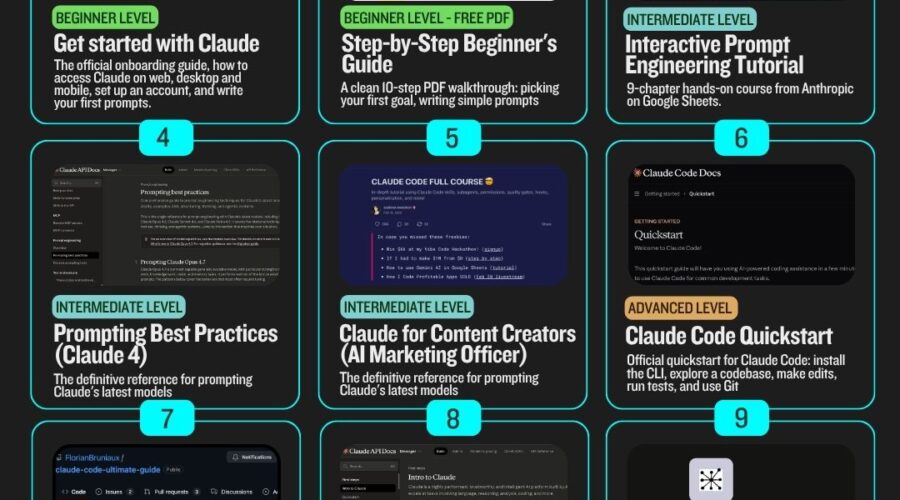
9 Free Guides to Master Claude

From your very first chat to building production AI agents β€” all guides are free and organised by skill level.

All 100% free
9 guides
4 levels
Updated April 2026

81 Marketing Prompts to Copy and Paste Into Any AI Tool


81 Marketing Prompts for AI Tools

81 Marketing Prompts to Copy and Paste Into Any AI Tool

Whether you’re writing ads, planning your brand strategy, or launching a digital product, these 81 ready-to-use AI prompts will save you hours of work. Simply replace the bracketed placeholders with your specific details and paste into ChatGPT, Claude, or any AI writing tool.


1. Ad Copy Prompts

Use these prompts to write high-converting ad copy for any platform β€” Facebook, Google, YouTube, and more.

  1. Write 5 Facebook ad headlines for [product] targeting [audience] who struggle with [pain point]. Each headline should be under 40 characters and create urgency.

  2. Create 3 variations of Google ad copy for [product/service]. Include a strong CTA, highlight one key benefit, and address the main objection [objection].

  3. Write a native ad script for [product] that blends into editorial content. Start with a relatable story, introduce the product naturally, and end with a soft CTA.

  4. Generate 10 ad hooks for [product] using these emotional triggers: fear of missing out, social proof, curiosity, and desire for transformation.

  5. Write a retargeting ad for people who visited [landing page] but didn’t buy. Acknowledge their hesitation, restate the key benefit, and offer a reason to return.

  6. Create YouTube pre-roll ad copy for [product] that delivers a compelling message in the first 5 seconds before the skip button appears. Keep the full ad under 30 seconds.

  7. Write a carousel ad sequence (5 cards) for [product]. Card 1: problem. Card 2–4: one benefit each. Card 5: CTA with offer.

  8. Write a video sales letter script under 90 seconds for [product]. Hook, problem, solution, proof, offer, CTA.

  9. Generate 3 split-test ad body copy variations for [product], each testing a different angle: (1) transformation, (2) fear of inaction, (3) social proof.


2. Brand Strategy Prompts

Build a clear, consistent, and compelling brand with these strategy prompts.

  1. Define a brand voice for [company] that sells [product/service] to [audience]. Output a voice guide with 4 personality traits, do/don’t examples for each, and a sample tagline.

  2. Write a brand positioning statement for [company] using this format: For [target audience] who [need/want], [brand] is the [category] that [key benefit] because [reason to believe].

  3. Identify 3 competitors of [brand], then write a differentiation strategy that clearly separates [brand] from each using unique positioning.

  4. Create a brand story for [company] using the hero’s journey: who they were before, the turning point, what changed, and the mission they’re now on.

  5. Write brand messaging pillars for [company]. Generate 4 pillars, each with a one-line statement, 2-sentence explanation, and 3 talking points.

  6. Develop a brand promise for [company] that is specific, credible, and memorable. Then write 3 ways this promise would show up in customer experience.

  7. Write an ideal customer profile for [brand]. Include demographics, psychographics, biggest fears, core desires, where they spend time online, and what they say when recommending products like ours.

  8. Create a brand messaging matrix for [company] with tailored messages for: cold audience, warm audience, and existing customers.

  9. Audit the messaging of [brand] based on this copy: [paste copy]. Identify gaps, inconsistencies, and write 3 improvement recommendations.


3. Content Repurposing Prompts

Get more mileage out of every piece of content you create by repurposing it across multiple formats and platforms.

  1. Turn this blog post into 10 tweets: [paste post]. Each tweet should stand alone, provide value, and end with a hook to the full article.

  2. Convert this YouTube transcript into a LinkedIn article: [paste transcript]. Keep the core insights, restructure for written format, and add a strong intro hook.

  3. Take this email newsletter and repurpose it into: (1) a short-form video script, (2) an Instagram carousel outline (5 slides), (3) a 280-character tweet. Source: [paste email]

  4. Repurpose this podcast episode summary into 3 different content formats for different platforms: a Twitter thread, a LinkedIn post, and a short blog intro. Summary: [paste]

  5. Extract 5 standalone social media quotes from this long-form piece. Each quote should be insightful, punchy, and require zero context to understand. Source: [paste]

  6. Turn these 3 customer testimonials into a short case study story, a social proof carousel, and a bullet-point FAQ section. Testimonials: [paste]

  7. Repurpose this sales page into an email nurture sequence of 3 emails: awareness, consideration, decision. Sales page: [paste]

  8. Convert this how-to guide into a Reels or TikTok script (under 60 seconds), a carousel post (6 slides), and a Twitter thread. Guide: [paste]

  9. Take this webinar Q&A section and turn it into a FAQ blog post, a 5-tweet educational thread, and a short explainer for a landing page. Q&A: [paste]


4. Email Sequence Prompts

Write complete email sequences for every stage of the customer journey β€” from welcome to win-back.

  1. Write a 5-email welcome sequence for new subscribers of [brand]. Email 1: warm welcome + what to expect. Email 2: brand story. Email 3: top resource. Email 4: social proof. Email 5: soft offer.

  2. Create a 3-email abandoned cart sequence for [product]. Email 1 (1hr after): reminder. Email 2 (24hrs): address top objection. Email 3 (48hrs): urgency + bonus.

  3. Write a post-purchase email sequence for [product] (4 emails): thank you + what’s next, how to get results, usage tips, and a referral/review ask.

  4. Create a 7-day onboarding email sequence for [SaaS/course/product]. Each email should drive one specific action and build on the previous.

  5. Write a re-engagement sequence for cold subscribers who haven’t opened in 90 days. 3 emails: curiosity hook, value bomb, final goodbye with opt-out.

  6. Build a flash sale email sequence for [product] over 3 days. Day 1: open cart. Day 2: urgency + objection handling. Day 3: 2 closing emails (morning + last call).

  7. Write a lead nurture sequence (5 emails) for [audience] interested in [topic]. Move them from problem-aware to solution-aware to your offer.

  8. Create an upsell email sequence triggered after purchase of [low-ticket product] to promote [high-ticket offer]. 3 emails over 5 days.

  9. Write a webinar follow-up email sequence: 4 emails post-webinar to nurture non-buyers into buying [product]. Include replay link, recap, testimonials, and final CTA.


5. Lead Magnet Creation Prompts

Create irresistible lead magnets that grow your list with the right audience.

  1. Create a lead magnet concept for [audience] struggling with [problem]. Give me 5 title options, the format (checklist/guide/template/etc.), and an outline of the content.

  2. Write a complete one-page checklist lead magnet titled ‘[Title]’ for [audience]. Include 15–20 actionable items grouped into 3–4 sections.

  3. Build a 3-day email mini-course on [topic] for [audience]. Write the subject lines and core teaching points for each day.

  4. Create a swipe file lead magnet for [niche] with 10 fill-in-the-blank templates they can use immediately. Topic: [topic].

  5. Write the copy for a lead magnet landing page for [title]. Include headline, subheadline, 5 bullet points of what they’ll get, and a CTA button.

  6. Design a quiz lead magnet for [audience]. Write 7 questions, 3 answer options each, and 3 result profiles with a personalized recommendation for each.

  7. Create a resource list lead magnet for [niche]. Curate 15 tools, templates, or resources with a one-line description of each and why it’s useful.

  8. Write the content for a quick-win guide (3–5 pages) that helps [audience] achieve [specific result] in [timeframe]. Include intro, 5 steps, and a conclusion CTA.

  9. Build an ROI calculator or self-assessment lead magnet concept for [audience]. Outline the inputs, scoring logic, and the insight/result they receive.


6. Facebook Content Creation Prompts

Grow your Facebook presence with posts that start conversations, build community, and drive traffic.

  1. Write a Facebook post for [brand] that starts with a scroll-stopping first line about [topic], shares a valuable tip, and ends with a question to drive comments.

  2. Create a week of Facebook content (7 posts) for [brand] in [niche]. Mix: 2 educational, 2 entertaining, 1 promotional, 1 testimonial, 1 behind-the-scenes.

  3. Write a long-form Facebook post (300–500 words) in the style of a personal story that leads to the insight: [key message]. Use conversational tone and short paragraphs.

  4. Create a Facebook poll + caption for [brand]. Topic: [topic]. Write the question, 4 answer options, and a 50-word caption to introduce it.

  5. Write a Facebook Live outline for [topic] that lasts 20 minutes. Include a hook intro, 3 teaching points, audience engagement questions, and a CTA.

  6. Generate 5 Facebook post hooks (first lines only) for [brand] that stop the scroll. Use curiosity, controversy, bold statements, surprising stats, or personal confessions.

  7. Write a Facebook group welcome post for a community about [topic]. Make it warm, set expectations, explain the rules, and prompt members to introduce themselves.

  8. Create a Facebook event post for [event/webinar/launch]. Include what it is, why they should care, what they’ll learn/get, and how to register.

  9. Write a Facebook ad disguised as organic content for [product]. It should look like a personal recommendation, use social proof, and have a native feel with a soft CTA.


7. Sales & Offer Copy Prompts

Write sales copy that converts β€” from full-length sales pages to one-line checkout bumps.

  1. Write a sales page for [product] targeting [audience]. Include: attention-grabbing headline, empathy-driven intro, benefit bullets, social proof section, offer breakdown, guarantee, and CTA.

  2. Create a VSL (video sales letter) script for [product]. Under 10 minutes. Follow: hook, problem, agitate, solution, proof, offer, bonuses, guarantee, CTA.

  3. Write the offer stack copy for [product]. List the core deliverable, 3 bonuses, total value, your price, and a reason why it’s priced lower. Make it feel like an obvious yes.

  4. Write 5 objection-busting copy blocks for [product] that address: price, time, skepticism, ‘not for me’, and ‘I’ll do it later’.

  5. Create a checkout page bump copy for a $[price] add-on to [main product]. Write the headline, 3-bullet value summary, and one-click CTA in under 100 words.

  6. Write an order confirmation page upsell for [higher-ticket offer]. They just bought [product]. Show them the next logical step using the momentum of their purchase.

  7. Create a one-time offer (OTO) script for [product] shown after opt-in. You have 5 minutes of their attention. Include scarcity, value, and a clear yes/no decision.

  8. Write the copy for a pricing page with 3 tiers for [product/service]. Include tier names, what’s included at each level, who it’s for, and recommended plan badge.

  9. Generate a proposal or pitch email for [service] tailored to a [business type] client. Include the problem you solve, your approach, what’s included, investment, and next step.


8. Case Study Prompts

Turn customer wins into persuasive proof that closes sales for you.

  1. Write a customer case study for [client/customer] using this structure: situation, complication, solution, results. Use real or placeholder metrics and quotes. Topic: [topic].

  2. Turn this customer testimonial into a full 500-word case study with context, challenges faced, how [product/service] helped, and measurable results. Testimonial: [paste]

  3. Create a case study landing page for [client story]. Include headline with result, 3-section story (before/during/after), a pull quote, stats bar, and CTA.

  4. Write a mini case study (150 words) formatted for a sales email insert. Focus on one specific result, one quote, and one CTA.

  5. Generate 3 hypothetical case study scenarios for [product] showing different use cases for: [persona 1], [persona 2], [persona 3]. Include a before/after format.

  6. Write a case study for a B2B client that focuses on ROI. Include: client background, challenge, solution implemented, timeline, and 3 specific results with numbers.

  7. Create a social proof story post (case study in story format) for Instagram or LinkedIn about a customer who achieved [result] using [product/service].

  8. Write the questions you would ask a customer to extract a compelling case study. Generate 15 interview questions that uncover the emotional journey and hard metrics.

  9. Turn this data/result summary into a compelling case study narrative that tells a human story while backing it up with numbers. Data: [paste results or metrics]


9. Digital Product Promotion Prompts

Launch, sell, and scale your digital products with copy that builds excitement and drives conversions.

  1. Write a launch announcement email for [digital product] to my existing list. Include: what it is, who it’s for, what problem it solves, launch price, and link.

  2. Create a 5-post Instagram launch sequence for [digital product]. Post 1: teaser. Post 2: problem. Post 3: solution reveal. Post 4: testimonial/proof. Post 5: open cart CTA.

  3. Write an affiliate email swipe copy for [digital product] that partners can send to their lists. Include subject line, 3 body variations (short/medium/long), and CTA.

  4. Generate a product description for [digital product] for a marketplace listing (Gumroad, Etsy, AppSumo, etc.). Include hook, what’s inside, who it’s for, and FAQ.

  5. Write a bundle promotion campaign for [product 1] + [product 2] + [product 3]. Include: the bundle name, combined value, bundle price, and a 3-email sequence.

  6. Create a waitlist page for an upcoming digital product in [niche]. Include: headline, what it is (without full reveal), 3 reasons to join early, and email capture form copy.

  7. Write a ‘behind the scenes’ content piece that builds anticipation for [digital product launch]. Suitable for email or long-form social post.

  8. Generate a referral/affiliate program recruitment message for [digital product]. Convince existing customers to become affiliates. Include commission, tools provided, and sign-up CTA.

  9. Write a post-launch recap email that re-opens the cart for [digital product] for 48 hours. Include what happened during launch, testimonials, and a final urgency CTA.


Replace every [bracketed placeholder] with your specific product, audience, or details before using. The more specific your inputs, the better the AI output.


God of Prompt

Description

God of Prompt is a GPT (Generative Pre-trained Transformer) designed to generate high-quality AI prompts for ChatGPT, Claude, Midjourney, and Gemini.

Users can select the AI tool they want to generate a prompt for and describe their ideas, after which God of Prompt creates a suitable prompt.

Use Cases:

Enhanced Communication:Β God of Prompt helps enhance the effectiveness of communication with AI tools by generating high-quality prompts.

Improved AI Interaction:Β Users can use God of Prompt to improve their interactions with AI tools, making them more productive and efficient.

User-Friendly:Β The tool is designed to be user-friendly, making it easy for anyone to generate AI prompts for various purposes.

Premium Features:Β God of Prompt may offer premium features or extended capabilities, requiring users to sign up and possibly have a membership of ChatGPT Plus.

Scroll to top